Right NowIn development
When your head is full, start with one useful next step.
Find somewhere to start, make space to focus, work through an everyday task or take a break. Right Now brings practical tools together in one approachable app.
Everyday support
Sometimes the hard part is knowing how to start.
- Sometimes you need information.
- Sometimes you need the steps.
- Sometimes you need ten minutes of focus.
- Sometimes you just need something fun to open.
Help me do it · How Do I
Don’t just tell me I can.
Show me how.
Break an everyday job into understandable steps, see what you may need and turn something uncertain into something you can start.
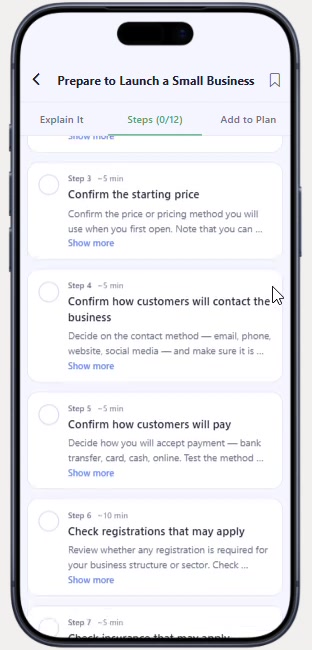
Prepare to Launch a Small Business
- 01 · UnderstandExplain It sets out what the job involves
- 02 · StepsTwelve steps, ticked off one at a time
- 03 · PrepareEach step notes what may be worth checking first
- 04 · Add to plan / DoAdd to Plan keeps it somewhere to return to
First steps shown on screen · 12 steps
- Confirm the starting price
- Confirm how customers will contact the business
- Confirm how customers will pay
- Check registrations that may apply
Games & Distractions
A quick break.
A score to beat.
Something to come back to.
Right Now explores different kinds of play because not every moment needs the same kind of distraction.
Thirteen games in the development catalogue, across three kinds of break. Pick one to see it from the current build.
A quick break.
A minute or two of something different when your head needs a pause.
Product visualisation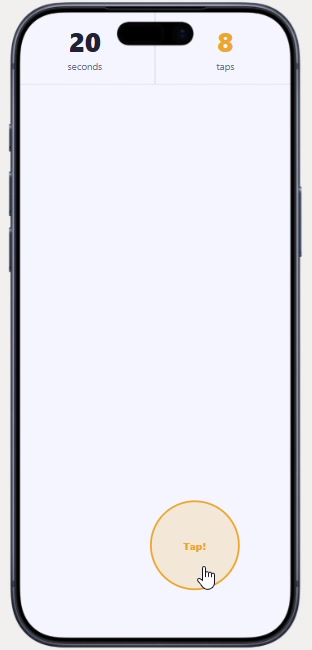
Rapid Tap
Tap as many times as you can before the timer ends.
Development catalogue: games are in development, not all are final, and the line-up may change. Tile artwork is website illustration. Games are for enjoyment and a break; they are not a treatment.
Support & reset
Support when things feel difficult.
Right Now is designed to offer different ways in depending on what someone needs in that moment.
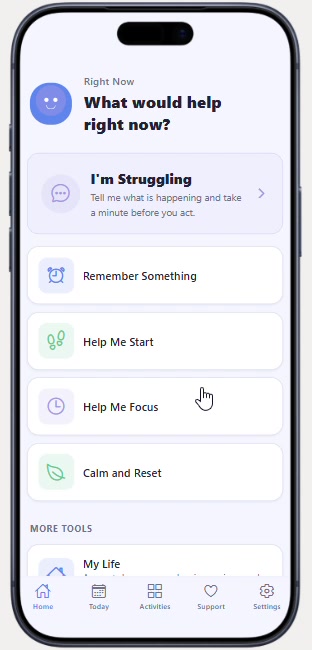
The home screen of the current build offers seven ways in:
- I’m Struggling
- Remember Something
- Help Me Start
- Help Me Focus
- Calm and Reset
- My Life
- Games & Distractions
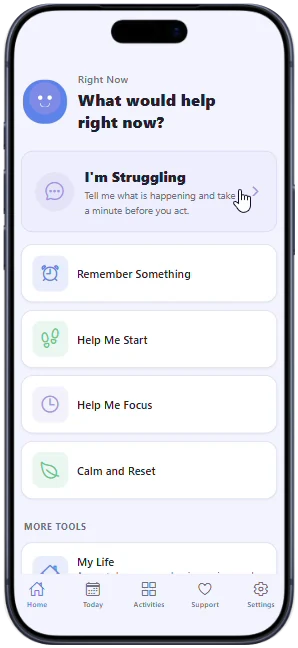
A plain place to start on a hard day
One of the first choices on the home screen—a clear route towards finding something that may help.
Right Now is an everyday-support app. It is not therapy, medical treatment, diagnosis or an emergency service.
Development build
One app. Many kinds of next step.
Three everyday situations, shown with real screens from the current development preview. Choose a screen to look closer.
Start one thing
A timer for the task in front of you. A guide for the job you keep putting off. Start with something manageable.
- Focus timer
- Completing a Form
- Making a Phone Call
- Preparing for Work
- Replying to a Message
Reset for a moment
Explore a calm activity or a support area without having to plan your whole day first.
- Calm & Reset
- I'm Struggling
Keep everyday things together
Practical guides, important information, goals and everyday organisation—alongside games when you need a different kind of break.
- My Life tools
- Important Things
- Goals and Plans
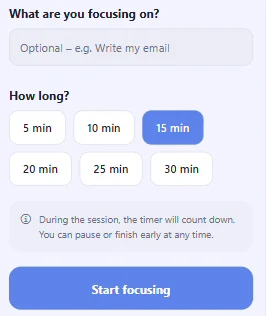
Help Me Focus
Name what you are focusing on, pick a length and start. The timer can be paused or finished early.
Money & life admin
Make everyday life easier to keep track of.
See bills and subscriptions, look ahead, set savings goals and keep important information together without turning life into another complicated system.
See where money goes
A simple map of money in and money out, so the month is easier to picture.
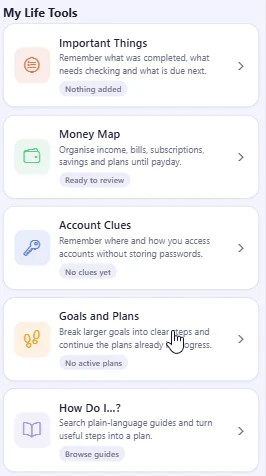
- Money MapSee what comes in and what goes out.
- Bills & SubscriptionsRegular payments in one list.
- Future PlannerLook ahead before it arrives.
- Savings GoalsSomething to put money towards.
An organiser for everyday life. Not professional financial or legal advice, banking, investment management or automatic bill payment.
Life does not arrive as one neat problem at a time.
Right Now is being built because sometimes the useful thing is support. Sometimes it is understanding how to do something. Sometimes it is organising money or life admin. Sometimes it is focusing for ten minutes. And sometimes it is taking a break.
Sometimes the difficult part is knowing where to begin. Right Now is being built around useful next steps, rather than another complicated system to manage.
Right Now is in development. Features and availability may change as the app develops.
Product visualisation
Choose an area. See a next step.
Fictional, neutral examples showing the shape of the idea. Nothing you choose here is stored or sent anywhere, and this is not the app.
Concept · Getting the day going
Where would you like to begin?
A next step
Open the curtains. Start with one small action.
One short, physical action is often easier to start than a plan.
Four ideas it is being built around
Approachable
Everyday language. A welcoming place to begin, without needing to know all the answers.
Simple
Clear choices and practical direction, with less to work through before finding a starting point.
Privacy-conscious
A privacy-conscious direction, with care around what an everyday-support tool asks of you. Not a security guarantee.
Local-first
Being designed with a local-first approach. The details will be shared as the product develops.
Where it stands
In development. Current plans, not promises.
These describe the present direction and may change before any release. There is no release date and nothing to buy yet.
- Intended to include an initial selection of areas available free.
- The current direction is a one-time lifetime full unlock rather than a subscription.
- No advertising is planned.